Published 17th March 2026
Why I Built man-tui, A Terminal UI for Man Pages
A fast, keyboard-driven TUI for browsing man pages.
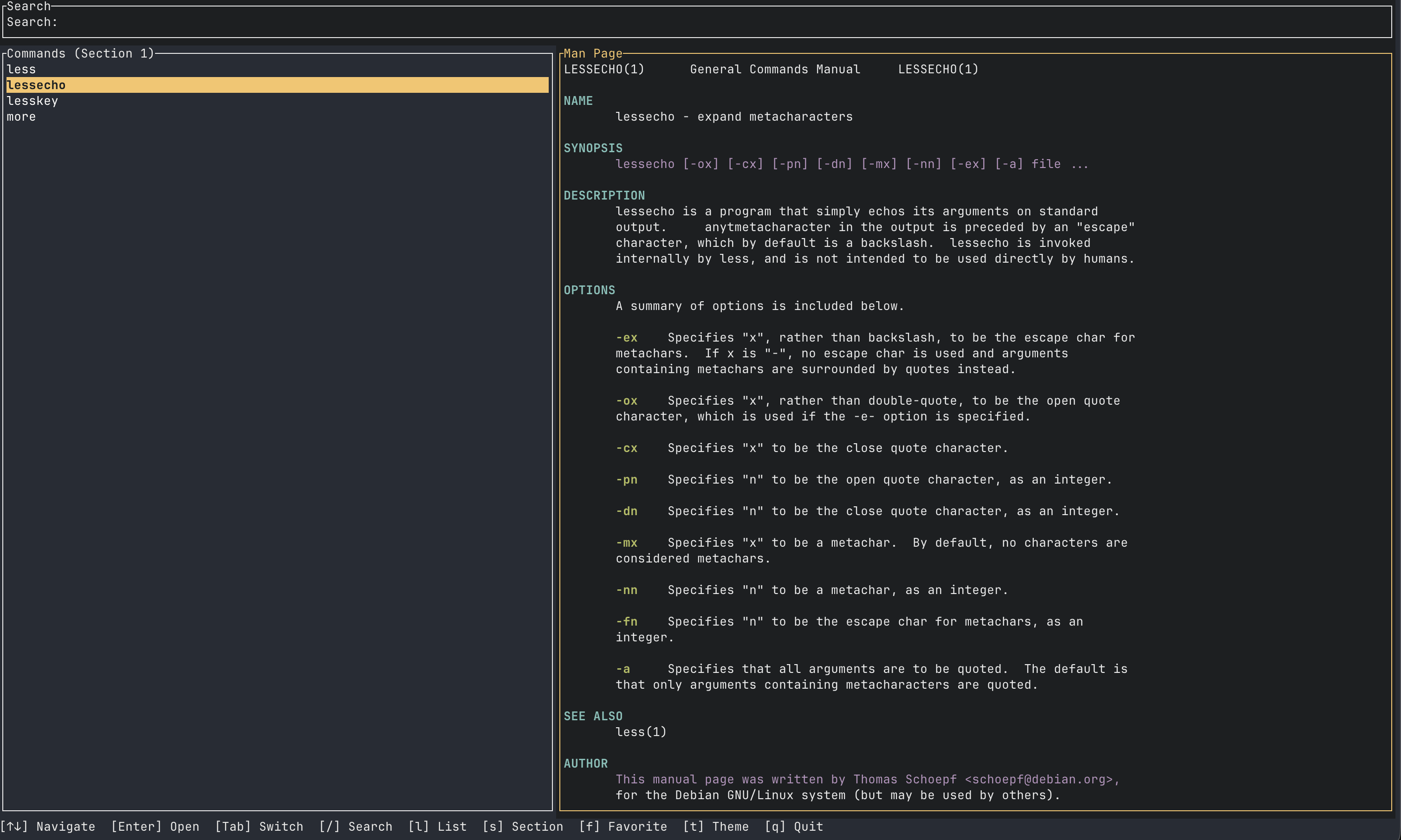
As a developer who lives in the terminal, I've always loved the power of Unix man pages; the definitive reference for command-line tools. But the traditional man command, while timeless, has always felt... rough around the edges. Scrolling through plain text with limited navigation, no fuzzy search, and a linear reading experience never quite matched the speed of my thinking.
That's why I built man-tui, a fast, keyboard-first terminal UI for browsing Linux and macOS man pages. It wasn't just about making man pages prettier; it was about creating a tool that feels like a natural extension of the terminal workflow I use every day.
The Problem with the Original
The classic man command is incredibly reliable, but it's also static. You type man grep, you get a long stream of text. You scroll with Space or Down. You search with /. That's it. There's no persistent history of what you've looked at, no way to quickly jump between related commands, no visual organization of sections, and no concept of "favorites" for commands you use daily.
And if you're like me, you often forget the exact command name but remember part of it. apropos helps, but it's clunky and returns a flood of results without preview. I wanted something that would let me type a fuzzy string and instantly see matching commands, then preview the man page side-by-side.
Enter TUI: The Right Tools for the Job
Rust has become my go-to for performance-critical tools, and the terminal UI ecosystem has matured beautifully. I chose:
- Ratatui (formerly tui-rs) for the widget layout; it's fast, well-designed, and handles complex split panes elegantly.
- crossterm for terminal input/output with raw mode control.
- fuzzy-matcher (Skim algorithm) for that sweet fuzzy matching that feels like magic.
Together these let me build a responsive, keyboard-driven interface that feels native to the terminal, not tacked-on.
What man-tui Actually Solves
- Speed: Open the app, start typing
git c, and instantly seegit checkout,git commit,git configappear. Press Enter, and the man page loads in the right pane. No waiting for a pager, no manual scrolling. - Context retention: The app caches command history and favorites in a simple TOML config. Your last-viewed command and section persist between runs.
- Section awareness: Man pages are divided into numbered sections (1 for user commands, 2 for system calls, etc.). man-tui lets you filter by section, so you don't confuse
printfthe shell builtin withprintfthe C function. - In-page search with navigation:
/starts a search, thenn/Nto jump between matches; all within the split view. No more leaving the pager to search again. - Theme toggle: Because staring at a black background all day can be soul-crushing; light mode exists.
The Learning Curve (For Me)
Building a TUI in Rust taught me a lot about:
- State machines: Focus management (search/list/viewer/section selector) is a classic state problem. Each keypress depends on which pane is active.
- Async I/O: Running the
mancommand and piping throughcol -bblocks the UI. For now it's fine since man pages are small, but a future version could cache parsed pages to disk for instantaneous loads. - Configuration ergonomics: Storing user preferences in TOML is simple, but I had to think about when to write back (on exit vs. after each change) to avoid corruption.
- Testing a TUI: Automated tests for a terminal UI are tricky. I focused on unit tests for the fuzzy search and command discovery logic, leaving the UI mostly manual for now.
Why Open Source?
Man pages are a shared resource, part of the Unix tradition. I wanted to give back a tool that respects that tradition but modernizes the experience. And because Rust's tooling and community make open source development a joy: cargo fmt, clippy, and a straightforward release process with GitHub Actions.
The Road Ahead
There are still things I'd like to add:
- Better handling of systems with non-standard man paths (e.g., Homebrew on macOS puts man pages in
/usr/local/share/man). - Syntax highlighting of code examples inside man pages (using tree-sitter or simple regex heuristics).
- Integration with
tldrpages as a fallback when no man page exists. - A "quick reference" mode that extracts just the SYNOPSIS and OPTIONS for the current command.
Try It Out
If you spend any time in the terminal and use man pages, I'd love for you to try man-tui. It's available on GitHub: aksharahegde/manrust. Build from source with cargo build --release or cargo install.
It also has a beautiful landing page at manrust.lovable.app.
Sometimes the best tools are born from annoyance. I was annoyed by the friction of reading man pages. So I built the tool I wanted to use. That's a formula that's worked for Unix since the beginning.
Thank you Akshara Hegde
To read the full article, click the link below.
https://aksharahegde.xyz/blog/why-i-built-man-tui